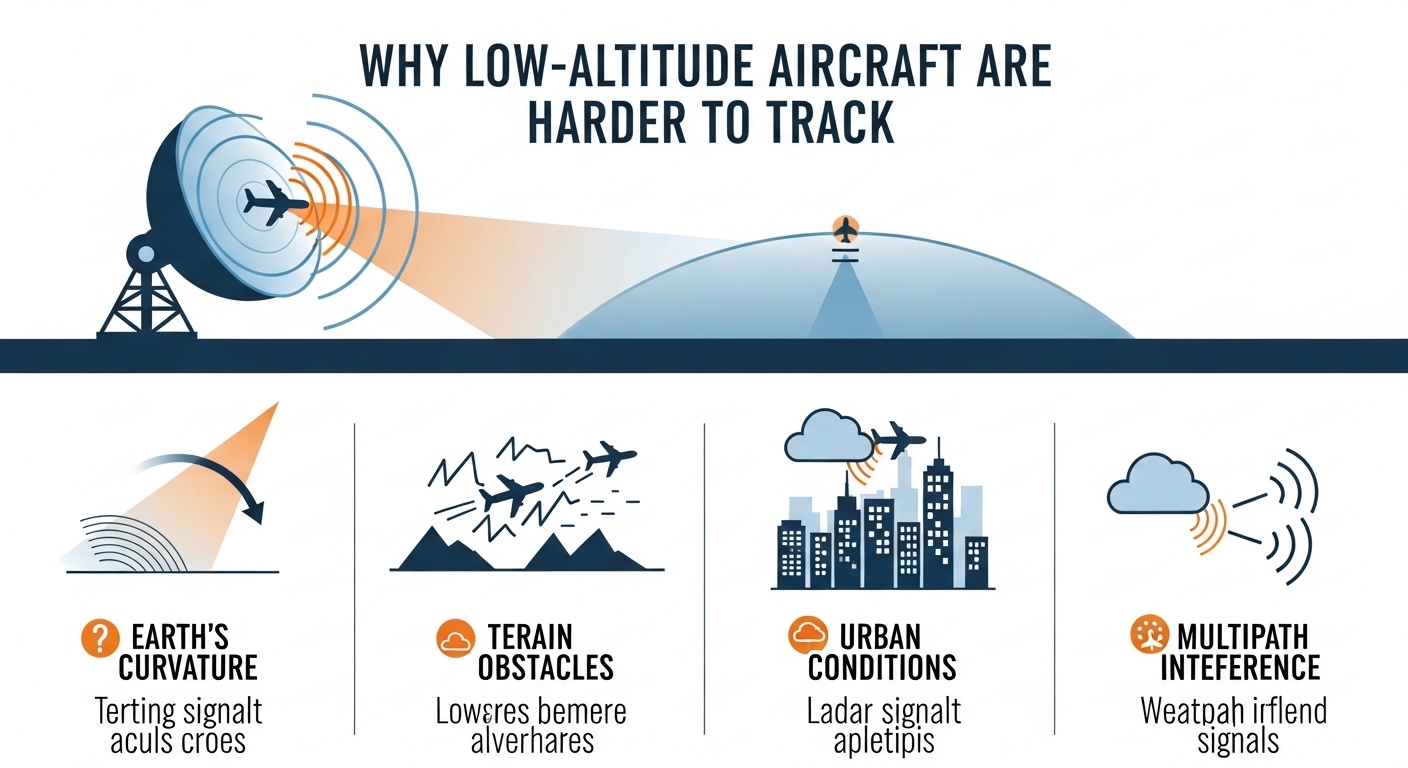
This image illustrates how the Earth’s curvature creates a “radar horizon,” a point beyond which a ground-based radar cannot see low-flying objects.
Introduction
When using a flight tracker, you may notice that some aircraft suddenly disappear or show incomplete data, especially when flying at low altitudes. This often leads to a common question:
Why are low-altitude aircraft harder to track?
The reason involves radar limitations, terrain interference, airspace rules, aircraft technology, and signal physics. In this article, we explain why tracking low-flying aircraft is more challenging and how modern systems attempt to solve this problem.
What Is Considered Low-Altitude Flight?
Low-altitude flight typically refers to aircraft flying:
- Below 10,000 feet
- Often under 5,000 feet
- Sometimes just a few hundred feet above ground
This includes:
- Helicopters
- Military aircraft
- Private and general aviation planes
- Drones and aerial survey aircraft
Main Reasons Low-Altitude Aircraft Are Harder to Track
1. Radar Line-of-Sight Limitations
Most ground-based radar systems require direct line-of-sight to detect aircraft.
At low altitudes:
- Earth’s curvature blocks radar coverage
- Buildings, hills, and terrain obstruct signals
- Radar beams pass above low-flying aircraft
This makes detection unreliable or impossible in some areas.
2. Terrain & Urban Obstruction
Low-altitude aircraft often fly near:
- Mountains
- Valleys
- Skyscrapers
- Dense urban environments
These obstacles:
- Reflect radar signals
- Create blind spots
- Cause signal scattering
This is a major reason helicopters and small aircraft disappear from flight trackers.
3. Limited ADS-B Signal Reach
Most flight trackers rely on ADS-B (Automatic Dependent Surveillance–Broadcast) signals.
At low altitude:
- ADS-B signals don’t travel as far
- Fewer ground receivers can pick them up
- Coverage gaps become common
ADS-B works best at high altitude where signals can travel hundreds of kilometers.
4. Military & Government Aircraft Restrictions
Some aircraft intentionally limit or disable tracking signals, especially:
- Military aircraft
- Law-enforcement helicopters
- Government surveillance flights
These flights may:
- Turn off ADS-B
- Use encrypted transponders
- Restrict public visibility for security reasons
This makes them invisible to public flight trackers.
5. General Aviation & Older Aircraft Equipment
Not all aircraft are required to carry modern tracking equipment.
Many small or older aircraft:
- Lack ADS-B Out systems
- Use basic transponders
- Fly in uncontrolled airspace
This reduces their digital visibility.
6. Airspace & Regulatory Limitations
Low-altitude airspace:
- Is often uncontrolled
- Has fewer radar installations
- Relies more on pilot self-reporting
As a result, tracking coverage is inconsistent compared to commercial flight corridors.
How Flight Trackers Attempt to Track Low-Altitude Aircraft
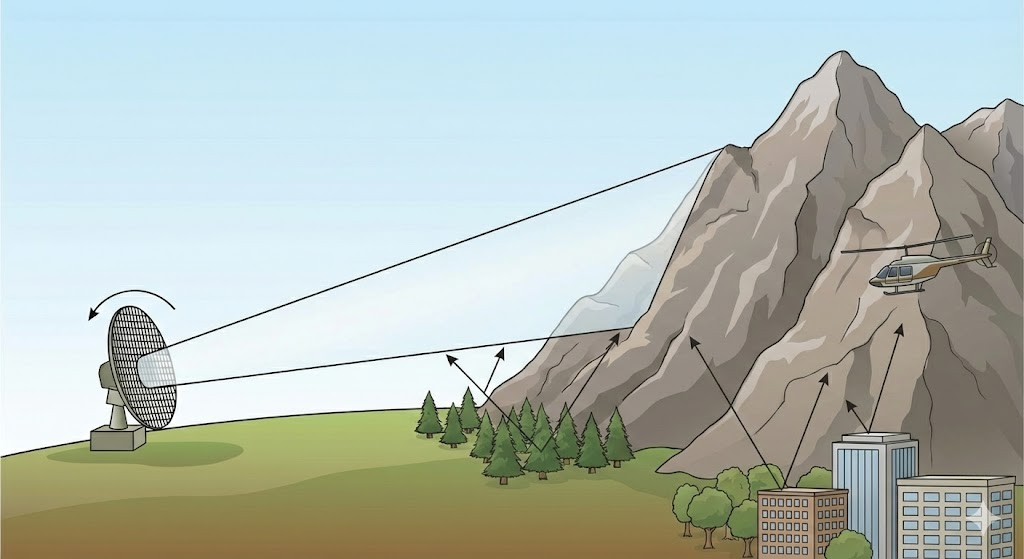
The image demonstrates two more reasons why low-altitude flight is an effective way to evade radar: terrain masking and ground clutter.
Modern flight tracking platforms combine:
- ADS-B receivers
- Multilateration (MLAT)
- Secondary surveillance radar
- Satellite-based tracking (limited at low altitude)
Popular platforms include:
- FlightRadar24 – https://www.flightradar24.com
- FlightAware – https://www.flightaware.com
- RadarBox – https://www.radarbox.com
Despite this, complete low-altitude coverage is still not possible.
Role of AI in Improving Low-Altitude Tracking
Predictive Flight Modeling
AI estimates aircraft position using:
- Last known speed and heading
- Historical route behavior
- Typical mission patterns
Signal Gap Compensation
Machine learning helps:
- Fill temporary tracking gaps
- Reduce false disappearances
- Improve data accuracy
These techniques enhance LLM SEO discoverability and Answer Engine accuracy.
Why Do Aircraft Reappear Suddenly on Trackers?
Aircraft often reappear when they:
- Gain altitude
- Exit terrain-blocked areas
- Enter radar or ADS-B coverage zones
This is normal and does not indicate an emergency.
Are Low-Altitude Flights Unsafe?
No. Low-altitude flights are:
- Fully legal
- Carefully planned
- Controlled by aviation regulations
Tracking limitations affect visibility, not safety.
Future of Low-Altitude Aircraft Tracking
Emerging solutions include:
- Space-based ADS-B improvements
- Urban radar networks
- AI-powered drone traffic management
- Dedicated low-altitude surveillance systems
These advancements will significantly improve tracking reliability.
Frequently Asked Questions:
Why do helicopters disappear from flight trackers?
Because they fly low, face terrain obstruction, and may limit tracking signals.
Are military aircraft tracked publicly?
Usually not, due to security restrictions.
Does low altitude mean radar failure?
No. It means radar coverage is limited by physics and geography.
Will tracking improve in the future?
Yes, with satellite tracking and AI enhancements.
Final Thoughts
Low-altitude aircraft are harder to track due to radar physics, terrain interference, limited ADS-B coverage, and regulatory factors. While high-altitude commercial flights are easy to follow, low-level aviation remains a technical challenge.
As aviation technology advances, AI-powered tracking and satellite surveillance will continue closing these gaps—making the skies more visible than ever.