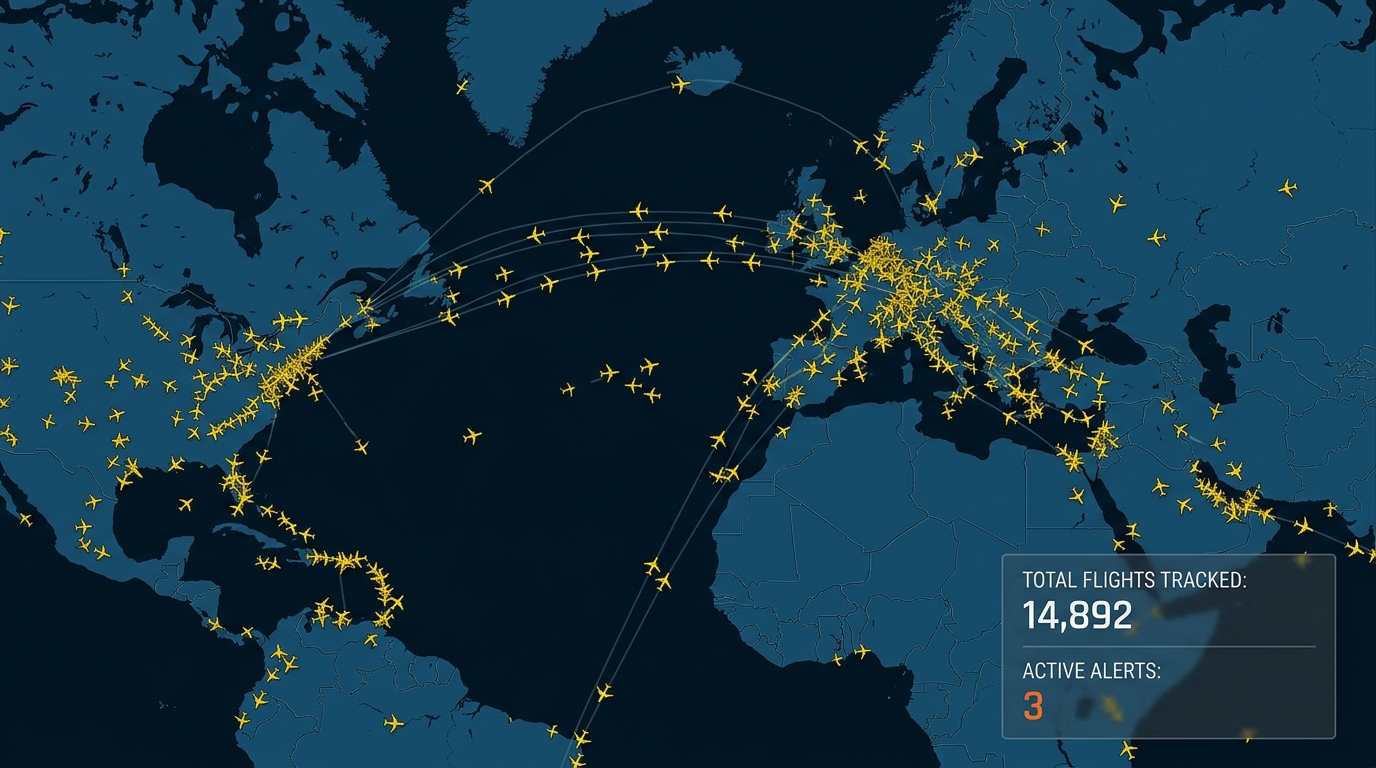
Whether you’re picking someone up from the airport, following a connecting flight halfway across the world, or just curious about the plane passing overhead, a live flight tracker turns what used to be a mystery into something you can watch unfold on a map in real time. A few years ago, the only way to know if a flight was delayed was to call the airline or stare at an airport departure board. Today, anyone with a phone can pull up a real time flight tracker, type in a flight number, and watch that exact aircraft move across the sky.
This guide walks through what a live flight tracker actually is, how the technology behind it works, and exactly how to track a flight in real time — whether you’re checking a single departure or keeping an eye on global air traffic for fun.
What Is a Live Flight Tracker?
A live flight tracker is a website, app, or dashboard that shows the real-world position, altitude, speed, and heading of an aircraft while it’s in the air — updated continuously, often every few seconds. Instead of a static schedule that just tells you when a flight is supposed to depart or arrive, a live airplane tracker shows you where the plane actually is right now, plotted on an interactive map.
Most modern flight tracking platforms pull this from public aviation data feeds and combine it with airline schedule data, so you get both:
- The plane’s live position, altitude, and ground speed
- Scheduled vs. actual departure and arrival times
- Gate and terminal information (when available)
- Delay status and estimated arrival updates
This combination is what makes a flight tracking live map so useful — it’s not just a dot moving on a screen, it’s a dot tied to real, verifiable flight information.
How Does Real-Time Flight Tracking Actually Work?
Understanding the mechanics behind a real time airplane tracking system helps explain why some flights show up instantly and others take a moment to appear, or don’t appear at all.
ADS-B: the backbone of modern flight tracking
Most commercial aircraft today broadcast a signal called ADS-B (Automatic Dependent Surveillance–Broadcast). This system takes GPS data from the aircraft’s own navigation equipment and broadcasts it out automatically — including position, altitude, speed, and identification — without needing a ground radar station to interrogate the plane first.
Ground-based receivers, many of them operated by volunteers and aviation enthusiasts around the world, pick up these ADS-B signals and feed them into networks that flight tracking platforms use to power their live maps. That’s how you can watch a flight radar live view updating smoothly instead of relying on outdated schedule data.
Radar and satellite data fill in the gaps
ADS-B coverage is excellent over populated areas but weaker over oceans and remote regions, since it depends on ground receivers within range of the aircraft. To track flights over open water — say, a transatlantic or transpacific route — many tracking services also incorporate satellite-based ADS-B data or multilateration techniques, which triangulate an aircraft’s position using multiple receivers instead of a single signal.
This is why some track international flights live features show slightly delayed or interpolated positions mid-ocean, even though the same flight looks perfectly smooth once it’s back over land.
Airline and airport data completes the picture
On top of raw positional data, tracking platforms layer in scheduling information directly from airlines and airports — gate numbers, runway assignments, and updated arrival estimates. This is what powers a proper flight tracker arrivals and departures board, letting you see not just where a plane is, but what that means for its schedule.
Why People Track Flights Live in the First Place
It’s worth stepping back for a second, because “tracking a flight” covers a wider range of situations than it might first seem.
- Airport pickups. Traffic, security lines, and gate walks add unpredictable time on both ends, so knowing the actual landing time — not the printed schedule — saves a lot of wasted waiting (or worse, a rushed arrival).
- Anxious flyers and worried family. For someone nervous about a loved one’s flight, being able to watch the plane’s actual position climb, cruise, and descend can be genuinely reassuring in a way a static “on time” label isn’t.
- Connecting flight math. If you’re booking a tight connection, or waiting to see if a delayed inbound flight will make your layover impossible, real-time tracking gives you a much earlier warning than an airport announcement would.
- Cargo and logistics. Businesses that depend on air freight use the same underlying data to plan warehouse staffing and delivery windows around actual arrival times rather than published schedules.
- Aviation enthusiasts. A large community of plane-spotters and aviation hobbyists uses live tracking purely for the enjoyment of it — watching specific aircraft types, spotting rare tail numbers, or just observing how busy the skies get during peak travel periods.
Understanding which of these you actually need helps you pick the right tool. Someone doing an occasional airport pickup doesn’t need the same feature set as a logistics team tracking dozens of cargo flights a day.
How to Track a Flight in Real Time
If you’re wondering exactly how to track a flight in real time, the process is simpler than most people expect. Here’s a practical, step-by-step approach.
Step 1: Get the flight number or route details
The most reliable way to find a specific aircraft is by its flight number — the airline code plus a number, like “AA100” or “EK202.” You’ll usually find this on a boarding pass, booking confirmation email, or by asking the person you’re tracking. If you don’t have the flight number, the departure and arrival airports plus the approximate departure time are usually enough to narrow it down.
Step 2: Open a live flight tracker online
Head to a live flight tracker online tool or app and search using the flight number. Most platforms will show you:
- Whether the flight is scheduled, boarding, in the air, or landed
- Its current position on a map (if airborne)
- Departure and arrival times, both scheduled and actual
- Any reported delays
Step 3: Use the live map view for real-time position
Once you’re viewing an active flight, switch to the map view to track flight live as it moves. You’ll typically see the aircraft’s icon oriented in its direction of travel, along with details like current altitude, ground speed, and estimated time of arrival that update automatically as the flight progresses.
Step 4: Track flight by number for repeat or connecting flights
If you need to track flight by number live across a multi-leg journey — say, someone flying with a layover — search each flight segment separately using its own flight number. Many tracking apps let you save flights so you get automatic updates without having to search again each time.
Step 5: Set up alerts if you want hands-off tracking
Most flight tracking app free options let you enable push notifications for a specific flight, so you’re alerted automatically about gate changes, delays, or landing — without needing to keep the app open and refresh it manually.
Live Flight Tracker With Map: What You’re Actually Looking At
A live flight tracker with map typically layers several types of information on top of a standard world map:
- Aircraft icons, often color-coded or shaped to indicate altitude bands or aircraft type
- Flight paths, showing the route already flown as a trailing line, and sometimes a projected path to the destination
- Airport markers, which you can usually click to see all current arrivals and departures at that specific airport
- Weather overlays, on more advanced tools, showing cloud cover or storm systems that might explain a delay or reroute
Clicking on any individual aircraft icon usually opens a details panel with the flight number, airline, aircraft type, altitude, speed, and origin/destination — everything you need to understand exactly what you’re looking at without leaving the map view.
Tracking Arrivals and Departures at a Specific Airport
Sometimes you’re not tracking one flight — you’re trying to understand everything happening at a particular airport. A dedicated flight tracker arrivals and departures view lets you search by airport code (like JFK, LHR, or DXB) and see a live, scrolling list of every flight coming and going, along with real-time status updates.
This view is particularly useful for:
- Timing an airport pickup around actual (not scheduled) arrival times
- Checking whether widespread delays are affecting a specific airport due to weather or congestion
- Comparing multiple flight options if you’re flexible on which flight to meet or book
How to Track International Flights Live
Tracking a domestic flight is usually straightforward, since it stays within dense ADS-B receiver coverage the whole way. To track international flights live, especially long-haul routes crossing oceans, a few things are worth knowing:
- Expect brief data gaps mid-ocean. As mentioned earlier, positional updates over open water rely on satellite coverage or multilateration, which can be slightly less frequent than land-based ADS-B.
- Time zones affect what “real time” looks like. A flight departing at 11 p.m. local time might display in a very different local time on your tracker, depending on your device’s settings — double-check you’re reading the right time zone before assuming a flight is delayed.
- Some regions have limited coverage. Areas with fewer ground receivers or airspace restrictions may show sparser tracking data, though major international corridors are generally well covered by modern live air traffic tracker networks.
The Best Flight Tracker Apps Worth Knowing About
There isn’t a single universally “best” option — the right choice depends on whether you want a simple one-off search or an app that becomes part of your regular travel routine. That said, when people ask about the best flight tracker app, a few categories of tools consistently come up:
Free, browser-based trackers
These are ideal if you just need to check a flight occasionally without installing anything. They typically offer a flight tracking app free tier covering flight number search, basic map view, and delay status — more than enough for casual use like tracking a friend’s arrival.
Dedicated mobile apps
A proper live flight tracker app download gives you push notifications, saved flight lists, and often richer detail like gate numbers and terminal maps. These are worth it if you fly often or regularly track flights for family members.
Real-time flight tracking apps for frequent flyers
A more advanced real time flight tracking app may include features like predicted delay likelihood based on historical data, boarding time reminders, and integration with your calendar or boarding pass wallet. These tend to be aimed at people who travel often enough that a few minutes saved per trip adds up.
Enthusiast-grade airplane tracker apps
If you’re genuinely interested in aviation, some airplane tracker app options go further — showing aircraft registration numbers, historical flight paths for a specific tail number, and even filtering by aircraft type. These tools double as a hobby platform for plane-spotters as much as a practical travel utility.
When comparing options, it’s worth checking whether the app updates in true real time or on a short delay, since some free tiers intentionally lag behind live paid data by a minute or two.
Live Air Traffic Tracker: Seeing the Bigger Picture
Beyond tracking a single flight, a live air traffic tracker view shows every aircraft currently airborne across a region — or the entire globe — at once. Zooming out on most tracking platforms reveals thousands of moving dots representing commercial flights, cargo planes, and sometimes private aircraft, all updating simultaneously.
This global view is genuinely useful beyond curiosity. It can help you:
- Spot patterns during major weather events, like widespread rerouting around a storm system
- Understand air traffic congestion around a specific region or time of day
- Get a sense of how busy a route is before booking, which can hint at flight frequency and connection options
How Accurate Is Live Flight Tracking, Really?
It’s worth setting realistic expectations. A live flight status tracker is highly accurate for aircraft actively broadcasting ADS-B data over well-covered regions — position updates every few seconds are common. But accuracy can dip in a few situations:
- Ground movement: some trackers show limited or delayed detail while an aircraft is taxiing before takeoff or after landing, since ADS-B ground coverage varies by airport.
- Military or restricted aircraft: certain flights are intentionally excluded or anonymized on public tracking platforms for security reasons.
- Data provider delays: free tiers of some tracking tools apply a short delay (commonly a minute or so) compared to their real-time paid feeds.
- Scheduling vs. tracking data mismatch: a flight status showing “on time” based on airline schedule feeds can occasionally lag slightly behind what the live map position actually suggests, especially right around departure or arrival.
None of this makes flight tracking unreliable — it just means treating the estimated times as, well, estimates, particularly in the final approach and landing window.
Tips for Choosing the Right Flight Tracking Tool
With so many options claiming to be the best way to track flights in real time, a few practical criteria make the decision easier:
- Check update frequency. Look for platforms that clearly state how often position data refreshes — true real-time tools update every few seconds, not every few minutes.
- Confirm map detail matches your needs. Casual users are usually fine with a simple map; frequent travelers may want terminal maps, gate info, and historical on-time performance data.
- Look for airport-level views, not just single-flight search, if you regularly need arrivals and departures information rather than tracking one specific plane.
- Test notification reliability before depending on an app for something time-sensitive like an airport pickup — a delayed push notification defeats the purpose of real-time tracking.
- Consider whether you need international coverage specifically, since not every free tool handles long-haul, cross-ocean routes with the same consistency as domestic flights.
Live Flight Tracking vs. Flight Status Checking: What’s the Difference?
These two terms get used interchangeably, but they’re not quite the same thing, and knowing the difference helps set the right expectations.
Flight status checking relies on schedule and airline-reported data — it tells you whether a flight is “on time,” “delayed,” or “cancelled,” based on information the airline pushes out. It’s accurate for high-level status, but it won’t show you exactly where the aircraft physically is at a given moment.
Live flight tracking goes a layer deeper by combining that same status data with the aircraft’s actual broadcast position. Instead of just “delayed,” you can see why it looks delayed — maybe it’s still on the ground, maybe it’s airborne but flying a longer route around weather, or maybe it’s already in its descent and simply running a few minutes behind the printed time.
For most everyday situations, a good real time flight tracker gives you both pieces of information in one place, which is why dedicated tracking platforms have largely replaced the old habit of just checking an airline’s status page.
Getting the Most Out of a Flight Tracking App
A few small habits make live flight tracking noticeably more useful day to day:
- Save recurring flights, like a partner’s regular commute or a family member’s frequent visiting route, so you’re not re-searching the same flight number every time.
- Cross-check time zones whenever a flight crosses regions, since a landing time shown in local destination time can look confusing if your app defaults to your home time zone.
- Use airport-level views during high-traffic periods like holidays, when checking the whole airport’s arrivals board can be faster than tracking one flight in isolation if plans are still in flux.
- Don’t rely solely on push notifications for anything truly time-critical — a quick manual check a few minutes before you need to leave for the airport is a good habit, since notifications can occasionally lag behind the live map.
Final Thoughts
A live flight tracker turns a genuinely useful piece of aviation technology — ADS-B broadcasting — into something anyone can use from their phone or browser. Whether you’re timing an airport pickup, tracking a loved one’s connecting flight, or just watching global air traffic move in real time out of curiosity, knowing how to track a flight in real time takes just a flight number and a few taps. Pick a tool that matches how often you actually need to track flights — a simple free tracker for occasional use, or a dedicated real-time flight tracking app if travel is a regular part of your life — and you’ll never be left guessing whether a flight is actually on time again.
Frequently Asked Questions
Can I track any flight, or only certain airlines?
Most commercial flights from major airlines are trackable, since virtually all modern commercial aircraft broadcast ADS-B data. Smaller private aircraft, older planes without ADS-B equipment, and certain government or military flights may not appear on public trackers.
Do I need to download an app to track a flight?
No — a browser-based live flight tracker online works fine for a one-off search. An app is more useful if you want notifications or plan to track flights regularly.
Why does a flight I’m tracking sometimes disappear from the map?
This usually happens during takeoff, landing, or over regions with limited ADS-B ground coverage, such as remote areas or open ocean. The aircraft reappears once it’s back within receiver range or transitions to satellite-based coverage.
Is live flight tracking free?
Most flight tracking platforms offer a solid free tier covering flight number search, basic map view, and delay status. Paid tiers typically add features like true real-time updates without delay, historical data, and more detailed aircraft information.
How early can I start tracking a flight before it departs?
Scheduling information is usually available as soon as the flight is published by the airline, often months in advance. Live position tracking only becomes available once the aircraft is actually airborne (or sometimes while taxiing, depending on airport ADS-B coverage).
Can I track a flight worldwide, no matter where it’s flying?
A capable live flight tracker worldwide tool should cover the vast majority of commercial routes globally, though coverage density varies by region. Busy international corridors are generally tracked reliably; remote airspace may show sparser updates.
Leave a Reply